
Configuring Mutual EIGRP & RIP Redistribution
Mututal redistribution is commonly done to fix architectural problems or during company acquisitions. This lab will discuss and demonstrate the configuration and verification of mutual EIGRP and RIP redistribution.
Real World Application & Core Knowledge
If you’ve completed Lab 10-2 – Configuring Mutual OSPF and RIP Redistribution and Lab 10-3 – Configuring Mutual OSPF and EIGRP Redistribution then you should be no stranger to mutual route redistribution.
If you did not complete the previous labs then to summarize mutual route redistribution up in a pretty little nut shell; mutual route redistribution is the process where two dynamic routing protocols exchange their routes with each other. For example, When you redistribute EIGRP into RIP, all routes in the EIGRP Autonomous System will be injected into the RIP database and show up as regular RIP routes. The same concepts apply to EIGRP when you redistribute RIP into EIGRP, all the routes from RIP will be injected into the EIGRP topology table and advertised through out the autonomous system as an EIGRP External route. These routes are denoted as “D EX” routes in the routing table.
Mutual route redistribution is a common remedy when companies acquire other companies that use different routing protocols. In such case Company ABC Inc. acquires Company XYZ Inc. however ABC Inc. uses EIGRP and XYZ Inc. uses RIP. After the acquisition, the CTO (Chief Technology Officer) Mandates that there be full network communication between the newly merged companies. In this case you’d need to perform mutual redistribution to ensure ABC Inc. has routes to XYZ’s network; vice-versa.
When you configure mutual route redistribution its best practice to specify a static metric. When specifying a metric keep in mind if you have multiple routers performing mutual redistribution you may need to have a higher metric on one router then the other to prevent a routing loop; this is where packets just keep going in circles between the two autonomous systems. It’s a safe bet to specify a fairly high metric in a production network to prevent such routes from becoming looped as lower metric routes are preferred.
To configure route redistribution you’ll use the redistribute command in router configuration mode.
Please review the following command(s) listed below;
| Command | Description |
|---|---|
| redistribute protocol metric {metric info} | This command is executed in router configuration mode of RIP, EIGRP or OSPF to configure the routing process to redistribute routes from a different source into the configured routing process such as static into RIP or RIP into OSPF. It’s best practice to specify a metric; when specifying a metric you specify a metric to be used by the routes when they appear in the routing process. For example, RIP uses hop counts, OSPF uses cost and EIGRP uses K Values (bandwidth, load, delay, reliability, mtu) |
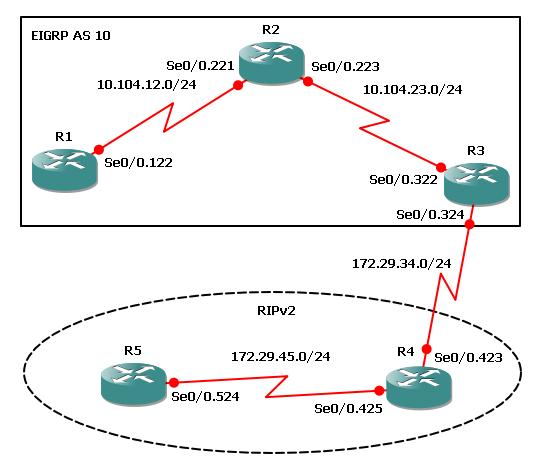
The following logical topology shown below is used in this lab;
Lab Prerequisites
- If you are using GNS3 than load the Free CCNA Workbook GNS3 topology than start devices; R1, R2, R3, R4, and R5
- Establish a console session with devices R1, R2, R3, R4, and R5 than load the initial configurations provided below by copying the config from the textbox and pasting it into the respected routers console.
Lab Objectives
- Create four new loopback interfaces on R1 using the 10.1.0.0/22 address allocation and configure those interfaces to participate in EIGRP Autonomous System 10.
- Create four new loopback interfaces on R5 using the 172.5.0.0/22 address allocation and configure those interfaces to participate in RIP.
- Analyze R3’s routing table and verify that the newly created loopback interfaces are being learned by R3.
- Configure R3 to redistribute EIGRP routes into RIP using a hop count of 3 then redistribute RIP routes into EIGRP using a T1 bandwidth and 20,000 microsecond delay.
- Verify on R1 and R5 that routes from the opposite autonomous system exist in their routing table.
Lab Instruction
Objective 1. – Create four new loopback interfaces on R1 using the 10.1.0.0/22 address allocation and configure those interfaces to participate in EIGRP Autonomous System 10.
R1#configure terminal
Enter configuration commands, one per line.  End with CNTL/Z.
R1(config)#interface loopback0
R1(config-if)#ip address 10.1.0.1 255.255.255.0
R1(config-if)#
R1(config-if)#interface loopback1
R1(config-if)#ip address 10.1.1.1 255.255.255.0
R1(config-if)#
R1(config-if)#interface loopback2
R1(config-if)#ip address 10.1.2.1 255.255.255.0
R1(config-if)#
R1(config-if)#interface loopback3
R1(config-if)#ip address 10.1.3.1 255.255.255.0
R1(config-if)#exit
R1(config)#
R1(config)#router eigrp 10
R1(config-router)#network 10.1.0.0 0.0.3.255
R1#
%SYS-5-CONFIG_I: Configured from console by console
R1#
Objective 2. – Create four new loopback interfaces on R5 using the 172.5.0.0/22 address allocation and configure those interfaces to participate in RIP.
R5#configure terminal
Enter configuration commands, one per line.  End with CNTL/Z.
R5(config)#interface loopback0
R5(config-if)#ip address 172.5.0.1 255.255.255.0
R5(config-if)#
R5(config-if)#interface loopback1
R5(config-if)#ip address 172.5.1.1 255.255.255.0
R5(config-if)#
R5(config-if)#interface loopback2
R5(config-if)#ip address 172.5.2.1 255.255.255.0
R5(config-if)#
R5(config-if)#interface loopback3
R5(config-if)#ip address 172.5.3.1 255.255.255.0
R5(config-if)#exit
R5(config)#router rip
R5(config-router)#network 172.5.0.0
R5(config-router)#end
R5#
%SYS-5-CONFIG_I: Configured from console by console
R5#
Objective 3. – Analyze R3’s routing table and verify that the newly created loopback interfaces are being learned by R3.
R3#show ip route
Codes: C - connected, S - static, R - RIP, M - mobile, B - BGP
       D - EIGRP, EX - EIGRP external, O - OSPF, IA - OSPF inter area
       N1 - OSPF NSSA external type 1, N2 - OSPF NSSA external type 2
       E1 - OSPF external type 1, E2 - OSPF external type 2
       * - candidate default, U - per-user static route
       o - ODR, P - periodic downloaded static route

Gateway of last resort is not set

     172.5.0.0/24 is subnetted, 4 subnets
R       172.5.1.0 [120/2] via 172.29.34.4, 00:00:25, Serial0/0.324
R       172.5.0.0 [120/2] via 172.29.34.4, 00:00:25, Serial0/0.324
R       172.5.3.0 [120/2] via 172.29.34.4, 00:00:25, Serial0/0.324
R       172.5.2.0 [120/2] via 172.29.34.4, 00:00:25, Serial0/0.324
     172.29.0.0/24 is subnetted, 2 subnets
C       172.29.34.0 is directly connected, Serial0/0.324
R       172.29.45.0 [120/1] via 172.29.34.4, 00:00:25, Serial0/0.324
     10.0.0.0/24 is subnetted, 6 subnets
D       10.1.3.0 [90/2809856] via 10.104.23.2, 00:05:50, Serial0/0.322
D       10.1.2.0 [90/2809856] via 10.104.23.2, 00:05:50, Serial0/0.322
D       10.1.1.0 [90/2809856] via 10.104.23.2, 00:05:50, Serial0/0.322
D       10.1.0.0 [90/2809856] via 10.104.23.2, 00:05:50, Serial0/0.322
D       10.104.12.0 [90/2681856] via 10.104.23.2, 00:09:59, Serial0/0.322
C       10.104.23.0 is directly connected, Serial0/0.322
R3#
Objective 4. – Configure R3 to redistribute EIGRP routes into RIP using a hop count of 3 then redistribute RIP routes into EIGRP using a T1 bandwidth and 20,000 microsecond delay.
R3#configure terminal
Enter configuration commands, one per line.  End with CNTL/Z.
R3(config)#router rip
R3(config-router)#redistribute eigrp 10 metric 3
R3(config-router)#exit
R3(config)#router eigrp 10
R3(config-router)#redistribute rip metric ?
  <1-4294967295>  Bandwidth metric in Kbits per second

R3(config-router)#redistribute rip metric 1544 ?
  <0-4294967295>  EIGRP delay metric, in 10 microsecond units

R3(config-router)#redistribute rip metric 1544 2000 ?
  <0-255>  EIGRP reliability metric where 255 is 100% reliable

R3(config-router)#redistribute rip metric 1544 2000 255 ?
  <1-255>  EIGRP Effective bandwidth metric (Loading) where 255
is 100% loaded

R3(config-router)#redistribute rip metric 1544 2000 255 1 ?
  <1-65535>  EIGRP MTU of the path

R3(config-router)#redistribute rip metric 1544 2000 255 1 1500
R3(config-router)#end
R3#
%SYS-5-CONFIG_I: Configured from console by console
R3#
Objective 5. – Verify on R1 and R5 that routes from the opposite autonomous system exist in their routing table.
R1#show ip route
Codes: C - connected, S - static, R - RIP, M - mobile, B - BGP
       D - EIGRP, EX - EIGRP external, O - OSPF, IA - OSPF inter area
       N1 - OSPF NSSA external type 1, N2 - OSPF NSSA external type 2
       E1 - OSPF external type 1, E2 - OSPF external type 2
       * - candidate default, U - per-user static route
       o - ODR, P - periodic downloaded static route

Gateway of last resort is not set

     172.5.0.0/24 is subnetted, 4 subnets
D EX    172.5.1.0 [170/3193856] via 10.104.12.2, 00:00:09, Serial0/0.122
D EX    172.5.0.0 [170/3193856] via 10.104.12.2, 00:00:09, Serial0/0.122
D EX    172.5.3.0 [170/3193856] via 10.104.12.2, 00:00:09, Serial0/0.122
D EX    172.5.2.0 [170/3193856] via 10.104.12.2, 00:00:09, Serial0/0.122
     172.29.0.0/24 is subnetted, 2 subnets
D EX    172.29.34.0 [170/3193856] via 10.104.12.2, 00:00:09, Serial0/0.122
D EX    172.29.45.0 [170/3193856] via 10.104.12.2, 00:00:09, Serial0/0.122
     10.0.0.0/24 is subnetted, 6 subnets
C       10.1.3.0 is directly connected, Loopback3
C       10.1.2.0 is directly connected, Loopback2
C       10.1.1.0 is directly connected, Loopback1
C       10.1.0.0 is directly connected, Loopback0
C       10.104.12.0 is directly connected, Serial0/0.122
D       10.104.23.0 [90/2681856] via 10.104.12.2, 00:11:13, Serial0/0.122
R1#
You can see from R1’s routing table shown above that the RIP routes redistributed into EIGRP at R3 are being propagated throughout the EIGRP Autonomous System as EIGRP External routes.
R5#show ip route
Codes: C - connected, S - static, R - RIP, M - mobile, B - BGP
       D - EIGRP, EX - EIGRP external, O - OSPF, IA - OSPF inter area
       N1 - OSPF NSSA external type 1, N2 - OSPF NSSA external type 2
       E1 - OSPF external type 1, E2 - OSPF external type 2
       * - candidate default, U - per-user static route
       o - ODR, P - periodic downloaded static route

Gateway of last resort is not set

     172.5.0.0/24 is subnetted, 4 subnets
C       172.5.1.0 is directly connected, Loopback1
C       172.5.0.0 is directly connected, Loopback0
C       172.5.3.0 is directly connected, Loopback3
C       172.5.2.0 is directly connected, Loopback2
     172.29.0.0/24 is subnetted, 2 subnets
R       172.29.34.0 [120/1] via 172.29.45.4, 00:00:20, Serial0/0.524
C       172.29.45.0 is directly connected, Serial0/0.524
     10.0.0.0/24 is subnetted, 6 subnets
R       10.1.3.0 [120/4] via 172.29.45.4, 00:00:21, Serial0/0.524
R       10.1.2.0 [120/4] via 172.29.45.4, 00:00:21, Serial0/0.524
R       10.1.1.0 [120/4] via 172.29.45.4, 00:00:21, Serial0/0.524
R       10.1.0.0 [120/4] via 172.29.45.4, 00:00:21, Serial0/0.524
R       10.104.12.0 [120/4] via 172.29.45.4, 00:00:22, Serial0/0.524
R       10.104.23.0 [120/4] via 172.29.45.4, 00:00:22, Serial0/0.524
R5#
You can see from R5’s routing table shown above that the EIGRP routes redistributed into RIP at R3 are now RIP routes on R5 with a metric of 4 (1 hop to R4 + 3 from R3’s added metric)
