
Configuring IP DHCP Helper Address
Have you ever wondered how DHCP clients get IP addresses from servers not on their own subnet? This lab will discuss and demonstrate the configuration and verification of an IP DHCP helper addresses.
Real World Application & Core Knowledge
So have you ever wondered how a single DHCP server can provide DHCP IP addresses to every PC on the network when the DHCP server is not on the same broadcast domain? After all DHCP request are broadcast request right?
Many people wonder how this works but the answer is quite simple. It’s called an IP Helper address. DHCP IP Helper addresses are IP addresses configured on a routed interface such as a VLAN Interface or a routers Ethernet interface that allows that specific device to act as a “middle man” which forwards BOOTP (Broadcast) DHCP request it receives on an interface to the DHCP server specified by the IP Helper address via unicast.
To configure an IP helper address you’ll use the ip helper-address a.b.c.d in interface configuration mode on the interface that is connected to the broadcast domain in which you wish to provide DHCP IP addresses. For example, a VLAN interface or an Ethernet interface on a router connected to a Cisco switch or segregated by a layer 2 VLAN.
In this lab R1 and R2 are placed separate VLAN’s and you will create DHCP pools for each VLAN on R1 then configure an IP Helper address on SW1’s VLAN20 interface connecting to R2 VLAN to ensure that devices on that Ethernet segment can receive DHCP IP address from the DHCP Server (R1). You will test the DHCP and IP Helper configuration using R2 as a simulated host PC.
Familiarize yourself with the following new command(s);
| Command | Description |
|---|---|
| ip helper-address a.b.c.d | This command is executed in interface configuration mode to enable a Layer 3 interface to receive BOOTP DHCP Request and forward them to a specified DHCP server. |
The following logical topology shown below is used in this lab;
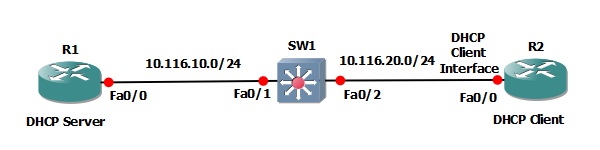
Lab Prerequisites
- If you are using GNS3 than load the Free CCNA Workbook GNS3 topology than start devices; R1, R2 and SW1
- Establish a console session with devices R1, R2 and SW1 than load the initial configurations provided below by copying the config from the textbox and pasting it into the respected routers console.
Lab Objectives
- On R1 create a new DHCP pool called “LAB_POOL2″ and assign it the following attributes; network 10.116.20.0/24, default-router of 10.116.20.2, domain name TESTLAB.LOCAL, DNS servers 10.116.18.6 & 10.116.18.7
- On SW1 configure the VLAN20 interface with an IP Helper address that points to 10.116.10.1
- Verify that R2 can receive a DHCP address from R1 in the 10.116.20.0/24 network.
Lab Instruction
Objective 1. – On R1 create a new DHCP pool called “LAB_POOL2″ and assign it the following attributes; network 10.116.20.0/24, default-router of 10.116.20.2, domain name TESTLAB.LOCAL, DNS servers 10.116.18.6 & 10.116.18.7
R1#configure terminal
Enter configuration commands, one per line.  End with CNTL/Z.
R1(config)#ip dhcp pool LAB_POOL2
R1(dhcp-config)#network 10.116.20.0 255.255.255.0
R1(dhcp-config)#default-router 10.116.20.2
R1(dhcp-config)#domain-name TESTLAB.LOCAL
R1(dhcp-config)#dns-server 10.116.18.6 10.116.18.7
R1(dhcp-config)#end
R1#
Objective 2. – On SW1 configure the VLAN20 interface with an IP Helper address that points to 10.116.10.1
SW1#configure terminal
Enter configuration commands, one per line.  End with CNTL/Z.
SW1(config)#interface vlan 20
SW1(config-if)#ip helper-address 10.116.10.1
SW1(config-if)#end
SW1#
%SYS-5-CONFIG_I: Configured from console by console
SW1#
Objective 3. – Verify that R2 can receive a DHCP address from R1 in the 10.116.20.0/24 network.
R2#configure terminal
Enter configuration commands, one per line.  End with CNTL/Z.
R2(config)#interface FastEthernet0/0
R2(config-if)#shut
R2(config-if)#
%LINK-5-CHANGED: Interface FastEthernet0/0, changed state to administratively down
%LINEPROTO-5-UPDOWN: Line protocol on Interface FastEthernet0/0, changed state to down
R2(config-if)#no shut
R2(config-if)#end
R2#
%SYS-5-CONFIG_I: Configured from console by console
R2#
%LINK-3-UPDOWN: Interface FastEthernet0/0, changed state to up
%LINEPROTO-5-UPDOWN: Line protocol on Interface FastEthernet0/0, changed state to up
R2#
%DHCP-6-ADDRESS_ASSIGN: Interface FastEthernet0/0 assigned DHCP address 10.116.20.3, mask 255.255.255.0, hostname R2

R2#ping 10.116.10.1

Type escape sequence to abort.
Sending 5, 100-byte ICMP Echos to 10.116.10.1, timeout is 2 seconds:
!!!!!
Success rate is 100 percent (5/5), round-trip min/avg/max = 48/108/164 ms
R2#
